AI Trend Video Generator: Pick by Trend (October)
Which AI trend video generator fits the crying, hotel lobby, APT and zombie trends? Input, length, watermark, card and per-clip cost checked on 9 Oct 2026.
Last updated: 9 October 2026
I run two of the tools in this AI trend video generator comparison, aicryingtrend and casttake, so read my placement of them with that in mind. I did not render one prompt on every tool and compare the footage. What I did do: on 9 October 2026 I opened each tool's own pricing or product page in a browser, copied the numbers that were actually on the page, and wrote "not stated" where they weren't. Where a page would not load, that is written down too.
The short answer: match the trend's input shape
| If the trend needs... | Look first at | Skip it if |
|---|---|---|
| One selfie, one fixed shot (the AI crying trend) | A vertical specialist: aicryingtrend or aicrying.org. CapCut or Pippit templates if you already edit there | You want to write your own shot description |
| Two people in one frame (hotel lobby rap duo, APT music video) | casttake, which takes two photos or one group photo | You need a free full-length clip |
| One photo and a crowd or scene around you (zombie ambush) | A preset such as the one on casttake, or a general model with your own prompt | You do not want to touch a prompt |
| A shot no template covers | A general model: Kling, Hailuo, Pika | You want a result in one click |
Why an AI trend video generator choice starts with the input
Trend clips look alike, so people shop on price. The input is what separates them. A crying-trend tool wants one clear front-facing selfie and returns an 8-second vertical clip. A duo trend wants two faces in specific roles. A general model wants a photo plus a paragraph of direction and gives you nothing you did not ask for.
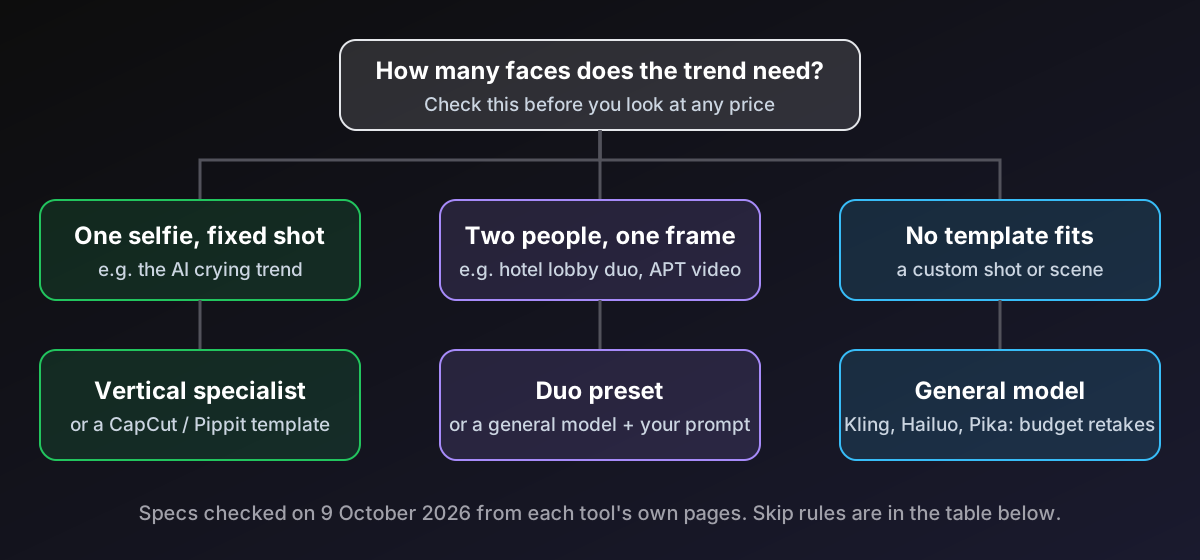
The tool that fits your input shape usually beats the one with the nicer demo reel. That is the whole method on this page, and everything below is a way to check it against real numbers.
Trend-specific tools: what each page said
Checked on 9 October 2026. "Not stated" means I read the page and the answer was not there.
| Tool | Input | Clip | Free allowance | Watermark | Login / card | Entry price |
|---|---|---|---|---|---|---|
| aicryingtrend | 1 selfie, 8 scenes, him or her | 8 s, 9:16, 720p | No free full video | None on paid | Google sign-in; card via Stripe | $9.99 for one video (10 credits) |
| aicrying.org | 1 selfie | 8 s, 9:16, resolution not stated | Not stated | "No watermark" | "No account or subscription" | $9.99 one, $19.99 for 3, $39.99 for 10 |
| casttake (hotel lobby, APT) | 2 photos, or 1 group photo | 10 s, 9:16 | 5-second preview | Preview is watermarked | Google sign-in; price shown on the button before you pay | $2.99 first video, once per account |
| Kavel | 1 clear face photo | Free: 4 s; paid: up to 30 s | 20 credits on login | "Small mark in the corner" on free runs (pricing page) | Page says "No Card, No Account" yet free videos need sign-in | Credits only; no USD price per crying clip |
Two details worth a second look. aicrying.org and aicryingtrend charge the same $9.99 for a single 8-second clip, and both say a failed render gives the credit back. And casttake's pages say its duo clips run on MiniMax H3, the same model name Hailuo's homepage now leads with, which tells you the template layer and not the model is what you are paying for.
General video models: what each page said
| Tool | What the page showed | What it did not say |
|---|---|---|
| Kling | Standard $6.99 first month, then $8.80 a month, 660 credits; "100 Credits = $1.06"; subscribers get brand watermark removal and 1080p/4K | Credits per clip; free allowance for non-subscribers |
| Hailuo | "From $9.99" a month on the homepage; a two-photo template and a one-photo template are listed; new accounts are offered sign-up credits | Plan table (the pricing page showed only the home page) |
| Pika | Free: 0 credits a month, packs only; Starter $10 a month for 900 credits; Creator $35 for 3,150 credits with a commercial license; "No watermark" listed on every plan | Clip length; its FAQ says shared videos carry a watermark, which contradicts the pricing table |
| Pippit | Free plan with daily credits, no card; paid plans remove the watermark; 10-second videos counted per month | Credit amount; USD prices (my page showed AUD) |
| CapCut | Help pages say some templates and elements add a watermark on the free version and Pro removes it | Everything about plans: capcut.com/pricing returned Not Found |
Three of these pages contradict themselves or hide the number. That is itself a selection criterion: if you cannot find the free-tier watermark rule in two minutes, assume you will find it on your first export.
What one finished clip costs
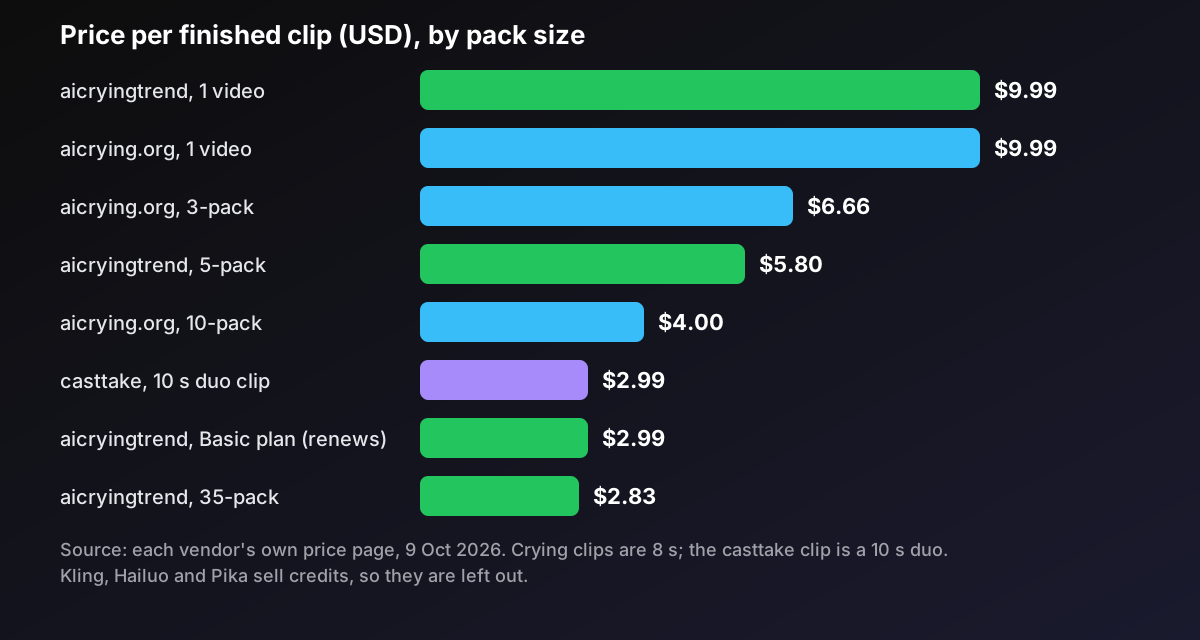
Per-clip prices from each vendor's own pack table. Only tools that state a price per clip are in the chart; Kling, Hailuo and Pika sell credits and I did not read how many a clip costs.
| Tool and pack | Clips | Per clip |
|---|---|---|
| aicryingtrend, single | 1 | $9.99 |
| aicryingtrend, Duo Pack | 5 for $29 | $5.80 |
| aicryingtrend, Crew Pack | 35 for $99 | $2.83 |
| aicryingtrend, Basic plan (renews monthly) | about 10 for $29.90 | $2.99 |
| aicrying.org, single | 1 | $9.99 |
| aicrying.org, 3-pack | 3 for $19.99 | $6.66 |
| aicrying.org, 10-pack | 10 for $39.99 | $4.00 |
| casttake, 10-second duo | first $2.99 once, then 80 credits | about $2.99 |
The uncomfortable line for my own site: if you want ten crying clips as a one-time purchase, aicrying.org's $39.99 pack is cheaper than buying two of aicryingtrend's five-packs ($58). aicryingtrend only wins that comparison if you take the $29.90 monthly plan, which keeps renewing until you cancel, or if you need around 35 clips.
Render time is the other cost. aicrying.org says 4 to 8 minutes, aicryingtrend says 3 to 6, and casttake's own pages quote anywhere from 3 minutes to 15 depending on the queue.
Skip it if: one line per tool
- aicryingtrend: skip it if you want a free full video, 1080p, or a shot other than the over-the-shoulder night scene and its seven variants.
- aicrying.org: skip it if you need to know the output resolution before paying, since the page does not say.
- casttake: skip it if you want an instant result or a free full clip; the free part is a 5-second watermarked preview, and a first video costs $2.99.
- Kavel: skip it if you want a flat USD price. The page prices in credits and the numbers I found did not reconcile.
- Kling, Hailuo, Pika: skip them if you do not want to write a shot description.
- Pippit, CapCut: skip them if you need to know the free export rules up front; I could not pin them down.
Trend by trend: where each tool sits
AI crying trend. One selfie, one night shot, a smile that breaks. Both specialists do that in one click. The template route (CapCut, Pippit) makes sense when you already live in those editors and want to try free credits; you give up the fixed shot and pick up an editing timeline. For a single clip, price is a tie. For batches, read the cost table.
Hotel lobby and APT duo. These need two faces in assigned roles, left and right. casttake is built for this and is where I would put it: first photo on the left, second on the right, 10 seconds. The cost of that convenience is the queue and the credit price. If you are comfortable writing a shot description, a general model with a two-image option removes the template fee, but I have not tested whether any of them hold two faces steady for ten seconds.
Zombie ambush and similar crowd shots. One face, a scene built around it. A preset keeps the camera and the horde consistent; a general model gives you freedom and more retakes.
Anything with a custom shot. Use the general models and budget retakes. Credits-based pricing makes the true cost per clip depend on your hit rate, which no pricing page can tell you.
What I did not test, and how to check it yourself
I did not run the same photo through every tool. I did not verify output resolution for aicrying.org, or Filmora's and Higgsfield's crying presets (their pages would not give me prices). To compare footage fairly, use the same front-facing photo, the same him-or-her choice, and watch the first two seconds and the last two: face drift shows up at the start, and the tear timing shows up at the end. If you only have budget for one test, spend it on the photo, not the tool; a sharp, front-facing selfie in good light is the input every page asks for.
FAQ
Which AI trend video generator should I use for the AI crying trend?
It depends on your input and how many clips you want. For one selfie turned into an 8-second vertical clip, the specialists aicryingtrend and aicrying.org both charge $9.99 for a single video. CapCut and Pippit offer template routes if you already edit there. Neither specialist has a free full video, so budget about $10 for the first clip. For batches, compare pack prices: aicrying.org lists 10 videos for $39.99, aicryingtrend lists 35 for $99. Pick the pack size that matches the number of clips you will actually post.
Is there a free AI trend video generator?
Not for a full-length clip on the trend-specific tools I checked. casttake offers a 5-second watermarked preview and then charges $2.99 for the first full video. Kavel lists 20 credits on login and 4-second free videos with a small corner mark. Pippit says its free plan includes daily credits with no card. Kling's free allowance for non-subscribers was not stated on the page I read. Treat free as a preview, and check the export screen before you rely on it.
How do I make the hotel lobby or APT two-person video?
You need two clear, front-facing photos, one per person, or one photo of both. On casttake the first photo is placed on the left and the second on the right, and the output is a 10-second vertical clip. Pick the order deliberately, because the roles follow it. Expect a queue of several minutes. A general video model can also take two images, but you will be writing the shot description yourself and may need several retakes. Where a preview is offered, run it first, because it shows both faces before you spend credits.
Do AI trend video generators put a watermark on the video?
Usually on free output, and usually not on paid. aicryingtrend and aicrying.org say paid videos have no watermark. Kavel says free runs carry a small mark in the corner. Kling lists brand watermark removal as a subscriber benefit. Whichever you pick, download one test file before you plan a posting schedule around it. Pika's pricing page lists no watermark on every plan, while its FAQ says videos shared directly from Pika carry one, so check the file you download. CapCut's help center says some templates add a watermark on the free version.
Why does my AI crying video not look like me?
Almost always the photo. These tools generate a new scene from one reference, so a small, dark, side-on or group photo gives the model too little face to hold. Use a sharp front-facing selfie with both eyes visible, no sunglasses, no heavy beauty filter, and your face filling a good part of the frame. A soft smile works best for the crying trend because it is the smile that has to break. If the result still drifts, rerender before blaming the tool.
Next step
If you are weighing the cost of a stack of these tools rather than a single clip, the AI tool stack cost calculator turns monthly plans into a per-month number. For a longer test of a different short-video format, read my AI brainrot video generator test, and for avatar video the HeyGen vs Synthesia comparison. Prices and limits on these pages change often, so I will update this page when the numbers move.
About the author: I'm Jim Liu, a Sydney-based developer who builds and runs small web tools. More on the about page.