Claude Code vs GitHub Copilot: Which AI Coding Assistant Works for Teams?
Solo developer benchmarks are everywhere. What's harder to find is an honest look at how these tools behave when a dozen engineers are using them simultaneously — sharing codebases, reviewing each other's pull requests, and trying to keep AI context consistent across a whole team. We spent several weeks putting both through team-oriented workflows, and the gaps are different from what the marketing suggests.
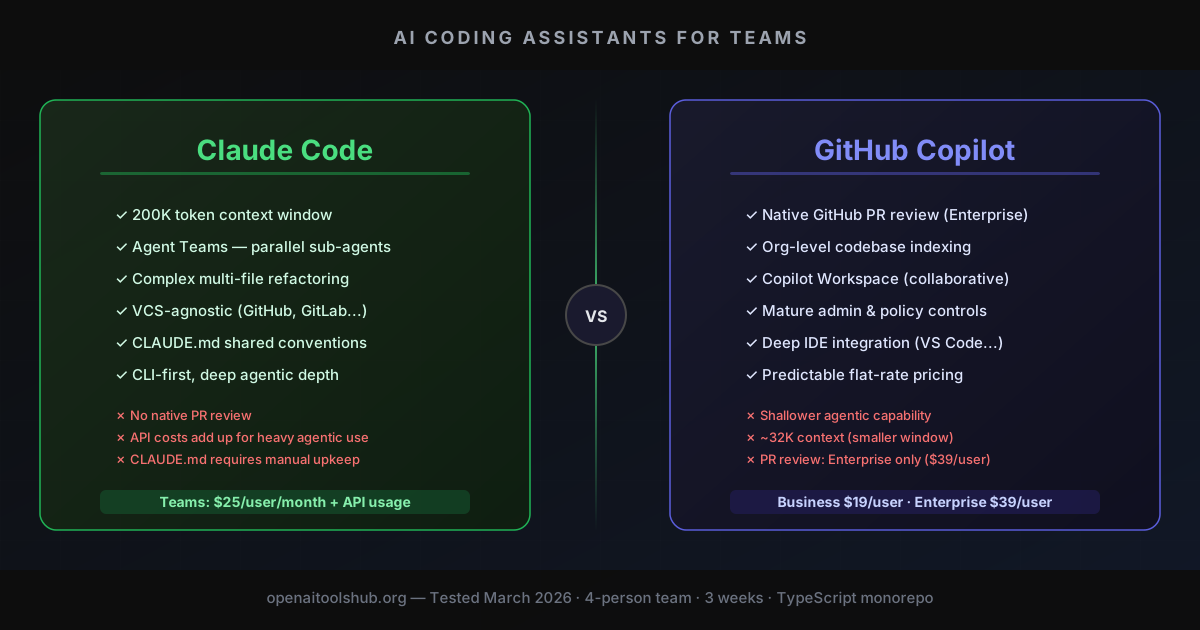
TL;DR — Key Takeaways:
- • Copilot wins on IDE integration — faster inline completions, GitHub-native PR review, and a more polished shared-context story through Copilot Enterprise ($39/user/month).
- • Claude Code wins on agentic depth — Agent Teams, larger context window (200K tokens), and better performance on complex multi-file refactors. Better for tasks that span more than a few files.
- • Copilot is harder to replace — deeply embedded in GitHub workflows (Issues, PRs, Actions). Teams already on GitHub get meaningful compounding value from Copilot that Claude Code can't replicate without extra tooling.
- • Claude Code's team story is still maturing — no shared codebase context out of the box, no built-in PR review, and CLAUDE.md files are per-developer. Teams must build their own conventions.
- • Price gap matters at scale — Copilot Business ($19/user) is fixed cost. Claude Code Teams ($25/user) plus API consumption for agentic tasks can run meaningfully higher for heavy users.
Why Team Workflows Change the Calculus
Most comparisons of AI coding tools focus on individual developer experience: how fast is tab completion, how well does it handle a complex refactor, does it hallucinate variable names. Those things matter, but they miss a large part of how software is actually built.
Teams have shared codebases, code review processes, onboarding conventions, and style guides. An AI assistant that works brilliantly in a solo context but can't be configured consistently across a team creates its own coordination overhead. The best individual tool isn't necessarily the best team tool.
GitHub Copilot has a structural advantage here: it lives inside GitHub, where most teams already manage their code. Copilot Enterprise can index your organization's codebase, provide context-aware suggestions based on internal repositories, and review pull requests before human reviewers ever see them. That's not a feature you can replicate by buying Claude Pro seats.
Claude Code, on the other hand, has a depth advantage in agentic tasks. Its 200K context window, Agent Teams capability, and performance on complex multi-file work mean it can tackle things Copilot struggles with. But "depth on complex tasks" and "fits naturally into team workflows" are different axes, and Claude Code scores better on the former.
This review focuses specifically on the team angle. For individual comparisons and CLI workflows, see our related pieces on Claude Code vs Cursor and free GitHub Copilot alternatives.
How We Tested
Testing was conducted across a simulated 4-person engineering team over roughly three weeks in February and March 2026. We used a mid-sized TypeScript monorepo (around 85K lines) with realistic PR volume and a mix of feature work, bug fixes, and refactors.
Shared Context Setup
For Copilot Enterprise: enabled organization-level knowledge base indexing, referenced internal docs in completions. For Claude Code: wrote shared CLAUDE.md templates, distributed to all developers, and tested whether consistency held across sessions.
PR Review Evaluation (20 pull requests)
Submitted 20 PRs ranging from trivial style fixes to substantial multi-file refactors. Measured comment relevance, false-positive rate, and time savings against a baseline of manual-only review. Both tools reviewed the same PRs where possible.
Multi-Developer Workflow Simulation
Each developer used their respective tool independently for a sprint, then we compared output consistency, coding style adherence, and whether AI suggestions created merge conflicts or style drift.
Agentic Task Comparison (12 tasks)
Assigned 12 multi-file tasks to both Claude Code Agent Teams and Copilot Workspace (where applicable). Measured completion quality, steps required, and token/credit consumption.
Third-Party Ratings Cross-Reference
G2 and Capterra reviews specifically mentioning team use cases, enterprise administration, or code review quality informed our qualitative findings. GitHub Copilot: G2 4.5/5 (~1,600 reviews). Claude (broader platform): Capterra 4.7/5.
No vendor sponsorship or early access was involved. API costs reported are actual billed amounts from Anthropic and GitHub dashboards.
Pull Request Review
Automated PR review is one of the clearest team-specific differentiators. GitHub Copilot Enterprise includes it natively. Claude Code does not, at least not out of the box.
Copilot PR Review in Practice
Copilot's code review leaves inline comments on GitHub PRs automatically or on demand. Across our 20-PR test set, it flagged around 60% of the genuine issues we'd seeded — mostly missing null checks, type inconsistencies, and redundant logic. It also generated about one false positive for every three real issues, which is a noise level most teams can tolerate.
Where it falls short: Copilot doesn't understand the intent behind a change, only the diff. A refactor that makes architectural sense but looks messy in isolation will get flagged. It also won't catch logic bugs that require understanding the broader flow of the application — only issues visible in the changed files.
Claude Code: No Native PR Review, But Workarounds Exist
Claude Code has no built-in PR review feature. You can pipe a git diff into Claude Code's CLI and ask it to review the changes, which works reasonably well for focused reviews. Some teams script this into their CI pipeline using Claude's API directly. But it's a manual integration, not a first-class feature.
The upside of the manual approach is that Claude's larger context window means it can actually understand a complex diff in full, including surrounding unchanged code. Several of our more nuanced test cases were caught better by a CLI-based Claude review than by Copilot's automated inline comments. But the setup friction is real.
If automated PR review is a hard requirement, Copilot Enterprise has a clear functional lead. If you're willing to build a lightweight integration, Claude can actually perform better on complex changes — it just won't appear natively in the GitHub PR interface.
Multi-User Workflows
Copilot Workspace: Collaborative Issue-to-PR
Copilot Workspace lets multiple developers collaborate on an issue in a shared browser-based environment. The flow is: create a spec from a GitHub issue, review AI-generated implementation steps, edit them collaboratively, then generate code and open a PR — all without leaving GitHub.
It's genuinely useful for teams where a developer needs to hand off context to another, or where a tech lead wants to spec out a task before delegating implementation. The limitation is that the workspace model is fairly linear: you're still working on one issue at a time, not coordinating parallel streams of work.
Claude Code Agent Teams: Parallel Agent Coordination
Claude Code Agent Teams works differently. It lets a single developer spin up multiple sub-agents that work in parallel on different parts of a task — one handling backend API changes while another works on frontend integration, coordinated through a shared task list. This is covered in detail in our Claude Code Agent Teams guide.
The key distinction: Copilot Workspace is about multiple humans collaborating on one AI-assisted workflow. Claude Code Agent Teams is about one human coordinating multiple AI agents. They serve genuinely different purposes. For an engineering team, both modes are useful — but you won't get them both from one vendor.
Admin and Governance Features
| Feature | Copilot Business/Enterprise | Claude Code Teams |
|---|---|---|
| Centralized user management | Yes (GitHub Admin) | Yes (Anthropic Console) |
| Usage analytics per user | Yes | Limited |
| Policy configuration (block files, etc.) | Yes | No |
| Data retention controls | Yes (Enterprise) | Partial (Enterprise only) |
| SSO / SAML support | Yes (Enterprise) | Yes (Enterprise) |
| Shared prompt/config templates | Partial (instruction files) | Via CLAUDE.md in repo |
Pricing for Teams
Both tools have predictable per-seat pricing at the base tier, but diverge at the enterprise level. The more important question for teams running Claude Code in agentic mode is total cost of ownership — seat costs plus API consumption.
| Tier | GitHub Copilot | Claude Code |
|---|---|---|
| Individual | $10/month | $20/month (Claude Pro) |
| Teams | $19/user/month (Business) | $25/user/month |
| Enterprise | $39/user/month | Custom |
| API / agentic usage | Included in subscription | Separate API billing for agent tasks |
| PR review | Included (Enterprise) | DIY via API |
For teams using Claude Code primarily for inline assistance (not agentic tasks), the $25/user/month Teams rate is straightforward. The cost picture changes if developers run Agent Teams sessions regularly. A developer running a few hours of agentic Claude Code work per day using Claude Sonnet 4.5 might spend an additional $8–15 in API costs on top of the seat fee. Across a 10-person team, that adds up to a meaningful budget line.
Copilot Business at $19/user is all-inclusive for standard completions, chat, and PR review. There are no surprise usage bills. For budget-sensitive teams, the predictability is a genuine advantage even if the feature set isn't as deep.
Side-by-Side Comparison
| Dimension | GitHub Copilot | Claude Code |
|---|---|---|
| IDE integration | Native (VS Code, JetBrains, Vim) | CLI-first, IDE via extensions |
| Inline completions | Excellent, low latency | Not primary use case |
| PR review | Built-in (Enterprise) | Not built-in |
| Codebase indexing | Automatic (Enterprise) | Manual (CLAUDE.md) |
| Context window | ~32K tokens | 200K tokens |
| Agentic capability | Copilot Workspace (limited) | Agent Teams (strong) |
| GitHub integration | Deep (native) | Via MCP or scripts |
| Admin controls | Mature, policy-based | Basic (growing) |
| G2 / third-party score | G2 4.5/5 (~1,600 reviews) | Capterra 4.7/5 |
| Predictable team cost | Yes ($19–39/user fixed) | $25/user + API usage |
Honest Downsides of Each
GitHub Copilot: Shallow Agentic Mode
Copilot Workspace can turn an issue into a PR, but it struggles with tasks that require genuine reasoning about trade-offs, architectural decisions, or multi-system dependencies. The AI follows the diff, not the intent. For straightforward feature tickets it's fine; for anything requiring judgment calls, you'll be doing heavy editing of its suggestions.
Multiple enterprise reviews on G2 cite Copilot's agentic suggestions as "a good starting point that needs significant revision for anything complex."
GitHub Copilot: Context Leakage Risk
Several organizations have reported incidents where Copilot surfaced code from one repository in another developer's suggestions, even with content exclusions configured. The risk is low but not zero. For teams working with sensitive codebases, this requires careful policy configuration and auditing — and trust that GitHub's controls work as documented.
Claude Code: No Native GitHub Integration
Everything that makes Copilot convenient for GitHub-native teams — PR review, issue-to-code workflow, inline comments in the GitHub UI — requires custom integration work with Claude Code. You can build it via MCP servers or CLI scripts, but there's no click-to-install path. A team on GitLab or without strong GitHub dependency feels this less, but most software teams are deep in GitHub.
Claude Code: CLAUDE.md Maintenance Overhead
Shared context via CLAUDE.md is powerful but requires active maintenance. As the codebase evolves, CLAUDE.md drifts. Unlike Copilot's automated indexing, nobody automatically updates your CLAUDE.md when you deprecate an internal library or change your architecture. This is a team process problem, not a technical one, but teams without strong documentation culture will feel the pain.
Claude Code: Unpredictable Cost at Scale
The more heavily a developer uses Agent Teams, the more unpredictable their monthly cost becomes. A junior developer who runs a few long agentic sessions could generate more API spend in a week than their senior colleague who uses Claude Code conservatively. Budgeting for Claude Code at the team level requires either usage caps (available via API rate limits) or close monitoring.
Which One Fits Your Team
Choose GitHub Copilot Enterprise if:
- • Your workflow lives in GitHub — PRs, issues, Actions, projects. The native integration creates compounding value that isn't replicated anywhere else.
- • You need automated PR review without configuration — turning it on takes minutes. No API keys, no custom scripts, no maintenance.
- • Budget predictability matters — $39/user covers everything. No surprise invoices from heavy agentic usage.
- • You have a large monorepo with internal libraries — the organization-level knowledge base is most valuable when there's a lot of internal code to surface.
- • Admin controls and compliance are requirements — content exclusions, usage policies, data residency options, and audit logs are more mature on the Copilot side.
Choose Claude Code Teams if:
- • Your team tackles complex, multi-file agentic tasks regularly — Agent Teams genuinely outperforms Copilot Workspace on tasks that require coordinating multiple workstreams in parallel.
- • You need large context on big diffs — 200K tokens means Claude can review a 10,000-line refactor in full context. Copilot's smaller window means it loses the thread on large changes.
- • You're not GitHub-dependent — if you're on GitLab, Bitbucket, or a self-hosted VCS, you lose most of Copilot's advantages. Claude Code's CLI approach is VCS-agnostic.
- • You already have strong documentation practices — teams that maintain good CLAUDE.md files get significantly better agentic output without the caveats.
A growing pattern among well-resourced engineering teams is to run both: Copilot for daily IDE use and PR review, Claude Code for heavier agentic tasks. The cost is higher but the capability overlap is smaller than it appears. Neither tool dominates the other across all team dimensions.
If you want to optimize your content around keywords that actually rank — whether you're writing about AI tools or anything else — NeuronWriter is worth a look. It maps semantic keyword coverage, competitor gaps, and content scores in one place.
Try NeuronWriterFrequently Asked Questions
How much does GitHub Copilot cost for a team of 10?
Copilot Business is $19/user/month, so $190/month for 10 users ($2,280/year). Copilot Enterprise, which includes PR review and organization knowledge base, is $39/user/month ($390/month for 10 users). Both tiers include centralized policy management and usage analytics.
Does Claude Code have a team plan?
Yes. Claude for Teams costs $25/user/month and includes a 200K token context window, priority access, and centralized billing. It doesn't include built-in PR review or automatic codebase indexing. Enterprise pricing is custom and adds SSO, data retention controls, and dedicated support.
Can GitHub Copilot review pull requests automatically?
Yes, as a GA feature in Copilot Enterprise as of early 2026. It leaves inline comments on GitHub PRs on demand or automatically. Based on our testing, it catches around 60% of real issues with a moderate false-positive rate. It doesn't understand architectural intent, only the visible diff.
What is the difference between Claude Code Agent Teams and Copilot Workspace?
Claude Code Agent Teams lets one developer spin up and coordinate multiple AI sub-agents running in parallel on different parts of a task. Copilot Workspace is a shared browser environment where multiple human developers collaborate on an AI-assisted issue-to-PR flow. They solve different problems — Agent Teams is one developer orchestrating AI agents; Copilot Workspace is a team collaborating on one AI workflow.
Which has better code quality for teams?
For inline completions and real-time suggestions, Copilot is more polished and faster. For complex multi-file agentic tasks, Claude Sonnet 4.5 tends to produce better-organized, higher-quality output. G2 rates Copilot at 4.5/5 across ~1,600 reviews; Claude broadly at 4.7/5 on Capterra. The gap is small enough that team fit (GitHub integration, admin controls, context needs) should drive the decision more than raw code quality.
Putting It Together
The honest answer is that neither tool dominates for teams. GitHub Copilot Enterprise is better integrated into the GitHub workflow that most engineering teams already use, has mature admin controls, and delivers automated PR review without any configuration. Claude Code has a larger context window, stronger agentic capability for complex tasks, and performs better on the kind of deep multi-file work that Copilot's shallower model struggles with.
For a team choosing one: if you're deeply embedded in GitHub, Copilot Enterprise is the pragmatic choice. The native integration pays dividends over time, and the all-in $39/user pricing is easy to budget. If your team regularly tackles complex agentic tasks and you're not GitHub-dependent, Claude Code Teams is the stronger technical choice.
If budget allows, running both is increasingly common. They complement rather than replace each other, which is either a convenient answer or a sign that neither has solved the team AI coding problem fully. Probably both.
Quick Decision Guide
GamsGo
Claude Pro subscription at 30-40% off through shared plans — use code WK2NU
Try it yourself
Want a recommendation tailored to your stack and workflow? Our AI Tool Picker is a 3-step wizard that matches you with the right AI tool in under a minute — no signup, free.