Codex Dream Skin: Install the Viral Codex Desktop Skin Tool (macOS and Windows)
Codex Dream Skin reskins the OpenAI Codex desktop app through local script injection, no official files touched. Pick your OS below for the exact install commands, or read on for how it works and whether it is safe to run.
TL;DR
- MIT-licensed, community-built, not an OpenAI release, 3,400+ stars within its first day
- Applies through local CDP injection bound to 127.0.0.1, no changes to app.asar or your API config
- macOS: double-click install, then double-click start. Windows: two PowerShell scripts
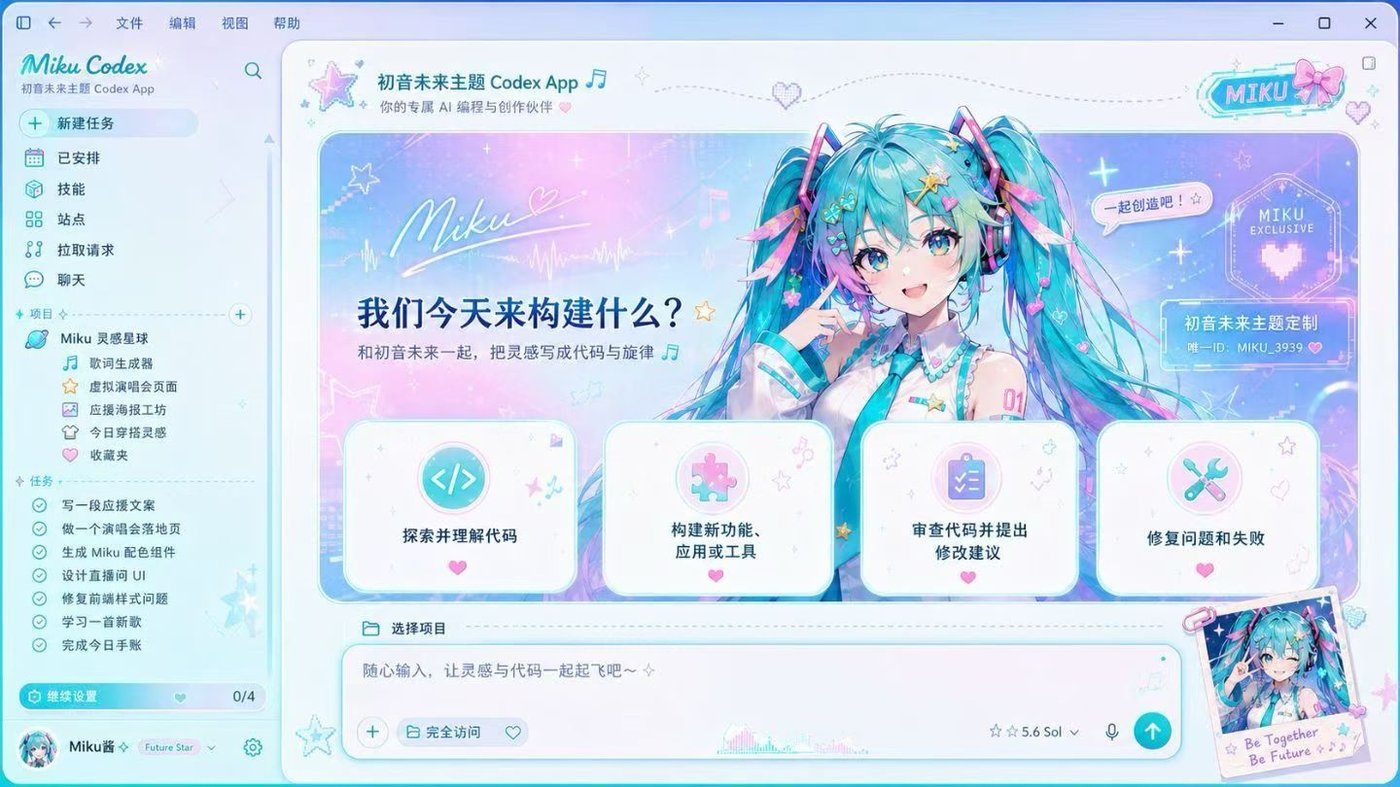
One of five skins shown further down this page
What Is Codex Dream Skin?
It is a third-party skinning tool for the OpenAI Codex desktop app, built by an independent developer under the GitHub handle Fei-Away and released under the MIT license. The repository went up on July 15, 2026, and had passed 3,400+ stars within its first day, helped along by a launch post on X. It ships eight illustrated skins, five of which are shown further down this page, and it also supports turning any image of your own into a theme.
The official Codex theme controls only touch colors and fonts. This tool goes further and reworks the chrome around the app itself, hero banners, sidebar panels, and background art, while every button, input, and menu keeps working exactly as before. It does this without opening a single file inside the Codex application, which is the detail worth understanding before you decide whether to run it. That mechanism is covered in the how-it-works section below.
How to Install It on macOS and Windows
Both platforms reach the same result through different tools: mostly double-click steps on macOS, four PowerShell commands on Windows. Pick your OS and the steps below change with it, including the exact commands and the restore step if you decide to remove the skin later.
Before you start
- macOS on Apple Silicon or Intel
- Codex desktop app installed and opened at least once (this creates ~/.codex/config.toml)
- Codex desktop app fully closed before you start
- No separate Node.js install needed, the installer uses the copy already bundled with Codex
- 1
Get the repo
Clone or download the repo from GitHub, then open the macos folder in Finder.
Commandgit clone https://github.com/Fei-Away/Codex-Dream-Skin.git
- 2
Run the installer
Double-click Install Codex Dream Skin.command inside the macos folder. It copies the theming engine to ~/.codex/codex-dream-skin-studio and adds five launcher icons to your Desktop.
Command./scripts/install-dream-skin-macos.sh --no-launch
- 3
Use your own image (optional)Optional
Skip this step to use the built-in skins. To use your own image instead, run the customize script with no flags for a Finder picker, or pass one directly. Source images up to 50MB in PNG, JPEG, HEIC, TIFF, or WebP work, and the tool prepares a lighter version on its own. Aim for 2000px width or wider.
Command~/.codex/codex-dream-skin-studio/scripts/customize-theme-macos.sh --image "/path/to/image.png" --name "My theme"
- 4
Start the skin
Double-click Start Codex Dream Skin.command on your Desktop (or the copy inside the macos folder) to apply the theme and launch Codex.
- 5
Verify it applied
Double-click Verify Codex Dream Skin.command. It checks that the hero banner, sidebar, and composer are all showing the skin, not just part of it.
Remove the skin
Double-click Restore Codex Dream Skin.command. This reverses the local CDP injection and hands the interface back to stock Codex. Your Codex installation itself was never modified, so there is nothing else to clean up.
Skin not showing? Troubleshooting for macOS
- Skin not showing after Start? Quit Codex completely with Cmd+Q, not just closing the window, then run Start Codex Dream Skin.command again.
- Want a menu bar toggle? Run Install Menu Bar.command once to add a SwiftBar-based skin icon to your menu bar.
- Verify reports a mismatch? Rerun the install step first, macOS sometimes blocks the first local CDP handshake with a security prompt.
Next: see what the skins actually look like in the gallery below, or jump straight to whether it is safe to run.
The Dream Skin Gallery: Five Named Skins
The full project ships eight skins in total. The five below span the range, from a soft pastel look to a full theatrical black-and-gold treatment. Click a card for a larger preview and a short description of each one.

Pink Customization 粉系定制
A pastel pink chrome laid over the standard Codex panels, light background, soft edges.
One of five skins shown here. All eight ship with the project and can be picked from the same local skin picker once Dream Skin is installed.
Want to browse Codex's own built-in palettes alongside these, or compare theming options side by side? Browse the full Codex themes gallery, which covers CLI and app theming plus all eight Dream Skin cards with filters.
How the Skin Tool Works Under the Hood (CDP Injection, No app.asar Edits)
The skin tool changes what you see in the Codex desktop app without ever opening the app's own installation files. It works through the Chrome DevTools Protocol, the same debugging interface Chromium-based apps like the Codex Electron shell expose for developer tools, and the connection is bound strictly to 127.0.0.1 so nothing outside your own machine can reach it.
On macOS, the installer checks Codex's code signature, Team ID, and CPU architecture before it will attach, and only opens a debug connection once all three match a genuine Codex build. That check is a large part of why the skin tends to keep working across Codex updates: a new release that still passes those checks works with the skin without any file inside Codex itself being touched.
None of this reaches your account settings. There is no code path in the injector that reads or writes your API key or base URL configuration, those stay exactly where Codex's own settings put them, untouched by the skin.
Two helpers keep the setup low-maintenance. On macOS an optional menu bar agent, added through the Install Menu Bar command, re-checks the connection every few seconds and re-applies the look if Codex restarts, so you rarely relaunch anything by hand. On Windows the bridge listens on a fixed local port (9335) and keeps its state in a CodexDreamSkin folder inside your user AppData, which is also where a backup of the original interface is saved. After a Codex update you re-run Start to reattach, Verify to screenshot and confirm the panels rendered, and Restore to roll everything back to the stock interface whenever you want.
The visual layer itself is a stylesheet plus a small renderer script that redraw the sidebar, suggestion cards, and input field, together with a theme file that maps each color. Running the Customize step, or the load-image and switch-theme scripts, rebuilds that theme from an image you point it at. That is how one engine produces the pink, stage black-and-gold, and sci-fi looks from a single code path rather than five separate builds.
Data as of 2026-07-16, based on the project's own documentation at the project's GitHub repository.
Is It Safe to Run?
This tool is not an OpenAI product, so the fair question is what a stranger's install script is allowed to touch on your machine. Its documentation is specific about the boundary: local CDP injection only, no modification of the Codex .app bundle, app.asar, or WindowsApps package, and no automatic changes to your API key or base URL. That is a narrower footprint than a lot of tools that promise to reskin an app.
It is still a local script with a live debug connection to a running Codex session, and that is real access even when it stays scoped tightly. The project's own advice is to avoid running unfamiliar programs on the same machine while the skin is active, and reading the install script before running it is a reasonable habit for any local automation tool, not just this one.
If something about the skin does not sit right after trying it, the restore step in the installer above hands the interface back to stock Codex in one step, with nothing left over to clean up afterward.
Codex Dream Skin vs. Official Themes and MOLTamp
These three options solve different problems rather than compete for the same job. Dream Skin goes furthest visually, official theming is the safest baseline, and MOLTamp is a shell around several coding agents rather than a Codex-specific skin.
| Option | What it is | Best for | Not ideal for |
|---|---|---|---|
| Dream Skin (this page) | A third-party installer that reskins the Codex desktop app through local CDP injection. Five named skins covered here, eight total in the project, plus support for your own image. | Codex desktop users who want a decorative, illustrated look and are comfortable running a local script from a smaller open-source project. | Codex CLI users, since the injection targets the desktop Electron shell only and has no terminal equivalent. |
| Official Codex themes (App Settings, CLI /theme) | Built-in base theme, accent and font controls, and the codex-theme-v1 export string, all inside Codex itself. | Anyone who wants a supported, auto-updating way to change colors and fonts without installing anything extra. | Anyone after a fully illustrated skin, the official controls stop at colors and fonts. |
| MOLTamp | A skinnable terminal shell that wraps Codex CLI, Claude Code, Gemini CLI, or Aider, rather than touching any one of them directly. | People running several CLI coding agents who want one consistent, heavily customized shell across all of them. | Anyone who specifically wants the Codex desktop app reskinned, MOLTamp only affects the surrounding terminal. |
Jim Liu
Builds and ships AI tooling, and writes setup and configuration guidance for developer-facing AI products. Publishes tools and analysis at OpenAI Tools Hub.
Frequently Asked Questions
How do I install Codex Dream Skin?▾
On macOS, download the repo, open the macos folder, and double-click Install Codex Dream Skin.command, then Start Codex Dream Skin.command to apply it. On Windows, run scripts/install-dream-skin.ps1 followed by scripts/start-dream-skin.ps1 from PowerShell. Full step-by-step commands for both are in the installer above.
Is Codex Dream Skin safe to use?▾
It is a third-party, MIT-licensed project, not an OpenAI release, so it is worth reading the source before running it. Its documentation states that theming happens through local Chrome DevTools Protocol injection bound to 127.0.0.1 only, that it does not modify the Codex .app bundle, app.asar, or WindowsApps package, and that it does not touch your API key or base URL configuration. The macOS build also checks Codex's code signature, Team ID, and architecture before it will attach. That is a narrower footprint than a lot of reskinning tools, but it is still local automation with a live debug connection to Codex, so avoid running unfamiliar programs on the same machine while it is active, the same caution the project's own docs give.
Does Codex Dream Skin work on Windows?▾
Yes. The Windows build needs Node.js 22 or newer and the Microsoft Store version of the Codex desktop app. Installation runs through three PowerShell scripts: install-dream-skin.ps1, start-dream-skin.ps1, and an optional verify-dream-skin.ps1 to confirm it applied.
Does Codex Dream Skin still work after a Codex update?▾
The project is built to discover the current Codex package dynamically rather than point at a fixed install path, so a rerun of the install and start scripts after a Codex update is usually enough to reapply the skin. If verification comes back with a mismatch right after an update, rerun the installer once before troubleshooting further, the app's internal structure can shift slightly between versions.
How do I use my own image as a theme?▾
On macOS, run customize-theme-macos.sh with an --image flag pointing at your file, or run it with no flags to get a Finder picker. Source images up to 50MB in PNG, JPEG, HEIC, TIFF, or WebP work, and a width of 2000px or more looks best. On Windows, replace assets/dream-reference.png in the installed folder with your own image, then rerun the start script.
How do I uninstall or restore the official Codex UI?▾
On macOS, double-click Restore Codex Dream Skin.command. On Windows, run scripts/restore-dream-skin.ps1, adding -Uninstall if you want the shortcuts removed entirely rather than just the skin turned off. Either way, Codex itself was never modified, so restoring just stops the local injection.
Is Codex Dream Skin an official OpenAI feature?▾
No. It is an independent, community-built, MIT-licensed project. OpenAI's own theming lives in Codex Settings and the CLI's /theme picker, covered on this site's Codex Themes page. It is a separate download that goes further than those built-in controls through local script injection.
Where can I download Codex Dream Skin?▾
From its GitHub repository at github.com/Fei-Away/Codex-Dream-Skin, either as a git clone or a downloaded zip of the macos or windows folder for your platform.
Related Tools and Guides
Codex Themes Gallery
Browse and filter every built-in and Dream Skin theme, with copy-paste config snippets
OpenAI Codex Review
A full hands-on review of the Codex CLI and app before you start customizing it
Claude Code MCP Config Generator
Build a working MCP server config for Claude Code in the same config.toml style
AI Coding Tools Guide
Where Codex fits next to Claude Code, Cursor, and other coding agents
Skin preview images are from the MIT-licensed Fei-Away's original repository project on GitHub, used here for identification purposes. This page is not affiliated with OpenAI or the Dream Skin project. Data as of 2026-07-16.